My Gomi Guide: Solving the Four-Bin Problem
Four bins, five collection days, and a poster I kept re-reading from the top. So I built a tool to stop holding that in my head.
I handle all the trash in my household.
We have a poster on our fridge. It explains which bin, which day, how to prepare each item. It’s been there since we moved in, held up by a plain magnet, taking up space I’d rather give to a travel souvenir.
Every few days I’d glance at it before heading to the trash room. Sometimes I’d read the whole thing from the top just to confirm what I already thought I knew.
So I built a tool. The rules are in my phone now. The poster is coming down.
That space on the fridge is going to Japan Rail Pass magnets.
Gomi is not simple
The Japanese word for trash is gomi (ごみ). Japan’s recycling system is thorough and has a learning curve. Minato ward has four regular collection categories, each on a different day, each with its own prep rules.
That fridge poster is bilingual: English and Japanese, with illustrated examples for each category. I photographed it and started cataloguing.
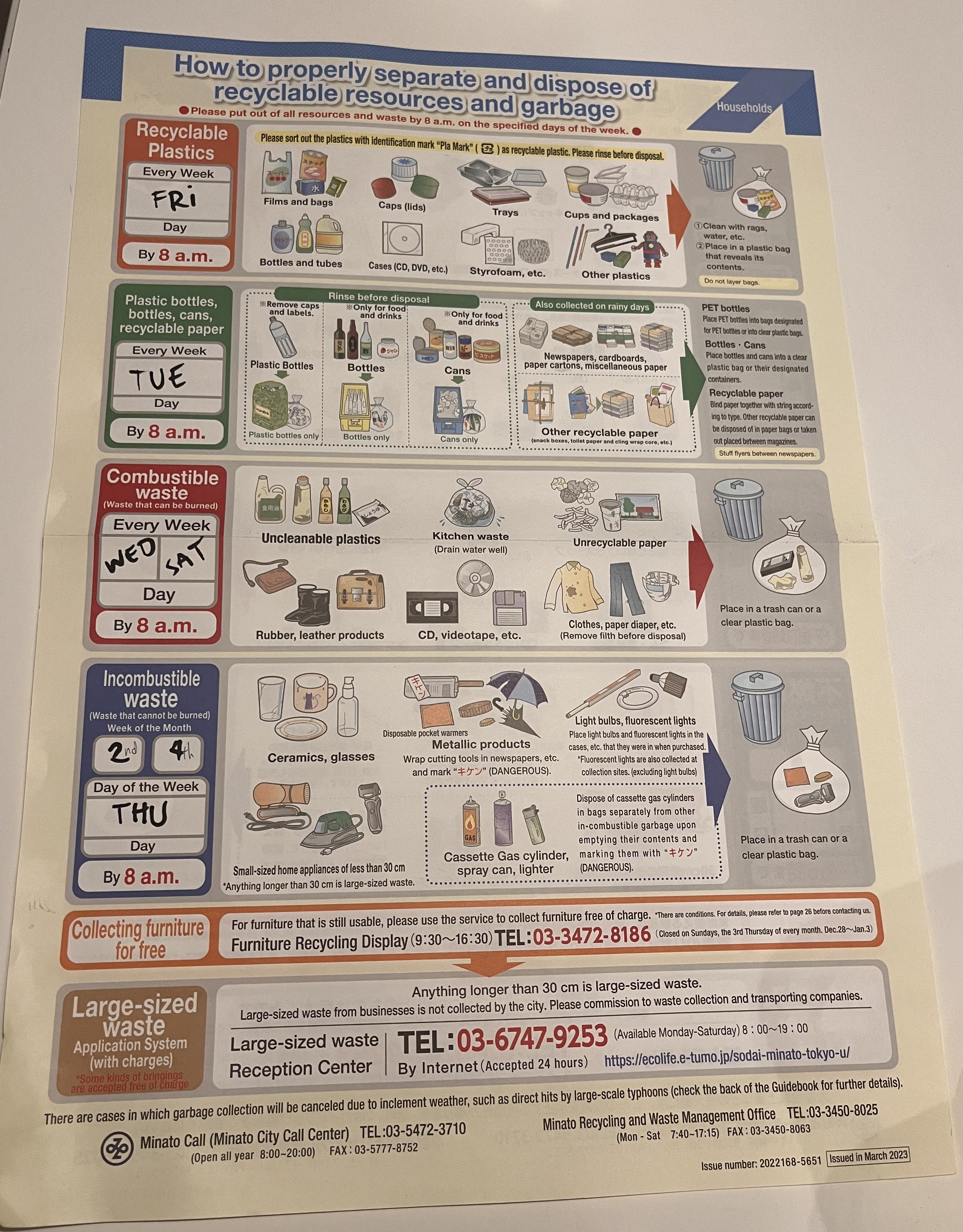
Here’s how the four categories break down:
Recyclable Plastics
資源プラスチック
- Plastic bags & food trays (プラ mark)
- Shampoo & detergent bottles
- Plastic wrap & cup lids
Every Friday. プラ-marked plastics, rinsed or wiped. Light residue is fine.
Resources
資源
- PET bottles (ペットボトル) — cap separate
- Glass bottles, aluminium & steel cans
- Newspaper, cardboard, clean paper
Every Tuesday. Rinse bottles and cans. Tie paper in bundles.
Combustible Garbage
可燃ごみ
- Food scraps, tissues, soiled paper
- Old clothes, rubber, leather
- Dirty styrofoam, pens without プラ mark
Every Wednesday and Saturday. The most frequent pickup.
Non-combustible Garbage
不燃ごみ
- Ceramics, broken glass, metal pots
- Light bulbs, umbrellas, small appliances
- Spray cans & gas canisters (empty, separate bag)
Only twice a month. Miss it and you wait two weeks.
The poster has the basics. It even shows プラ for recyclable plastics. Here’s what I figured out by actually sorting:
Plastic is two categories
PET bottles go Tuesday as resources. プラ trays go Friday as recyclable plastics.
The cap comes off
Bottle is resources (Tue). Cap is recyclable plastics (Fri). Same item, split across pickups.
Dirty vs clean styrofoam
Clean with プラ mark = recyclable plastics. Soiled or greasy = burnable. Same material, different bin.
Non-combustibles twice a month
2nd and 4th Thursday. Miss it and you wait two weeks.
Over 30 cm is separate
Large waste (粗大ごみ) needs an advance booking, fee, and scheduled pickup. Not the bin.
What I built
The dataset covers 50 items across all four categories. Beyond the standard items, it covers the edge cases that matter most.
Tricky edge cases you will encounter
-
Rechargeable batteries are a fire hazard
Since September 2025 Minato takes them on the non-combustible day. Tape the terminals, bag them separately, and label the bag キケン. Drop-off boxes also work. Never mix them into resources or plastics.
-
Smartphones go in a ward office collection box
Delete your data first. These need a separate drop-off, not regular ward collection.
-
Home appliances under the Appliance Recycling Law
Items like TVs, ACs, and refrigerators require a special disposal route, not regular pickup.
Search results show a one-line TL;DR, the collection day, and a prep section broken into bullets. The weekly schedule auto-highlights today’s collection.
Before generating a line of code
I framed what “good” meant for this specific tool.
| Goal | Why |
|---|---|
| Correctness first | A wrong guess means your garbage stays in the shared trash room. No answer is safer than a confident guess. |
| Precision over recall | Search “conditioner” and the results include air conditioner too. With 50 items, false positives create more noise than a missed match. |
| Data changes without deploys | Misclassifications happen after launch. Fixing a keyword shouldn’t require a site rebuild. |
The constraints I was working inside:
| Constraint | What it ruled out |
|---|---|
| No server runtime | The site is output: 'static' Astro. All logic runs in the browser. |
| No React | The whole site is Astro + vanilla TypeScript. Significant framework overhead for one filterable list is not worth it. |
| Tailwind JIT scanning | Discovered mid-build. Tailwind scans source files at build time. JSON fetched at runtime is invisible to it. Style strings had to stay in component source. |
Here’s what the system looks like from the outside:
System context
Developer
Code change
Data change
Vercel CDN
HTML / JS / CSS
Built at deploy time
Vercel Blob
gomi-dataset.json
Updated without redeploy
Browser — resident
The browser gets code from Vercel’s CDN and data from Blob. A data fix is a file upload. A code change goes through git. Neither requires the other.
How it evolved
It started as a simple list.
| Step | What changed | Problem it solved |
|---|---|---|
| 1 | Hardcoded array inside the component | Get something working; all data in one place |
| 2 | Dataset moved to Vercel Blob | Fix misclassifications without a full redeploy |
| 3 | CATEGORY_STYLES constant in component source | Category colors disappeared when style strings moved to JSON |
| 4 | Three-state loading machine | Async fetch needs explicit handling for loading, error, and success |
| 5 | Icons, TL;DRs, dedicated tool shell | Faster scanning; tool feels like a tool, not a page on a blog |
Steps 2 through 4 each left a mark.
The Tailwind gotcha that bit me
Tailwind’s JIT compiler scans source files at build time and generates only the CSS classes it finds. JSON fetched at runtime is invisible to it. Move category color strings into that JSON and they get dropped from the compiled CSS entirely. Everything renders unstyled.
{
  "plastics": {
    "badge": "bg-sky-100
              text-sky-700
              dark:bg-sky-900/40"
  }
}
Tailwind can't scan this at build time. The classes get stripped.
const CATEGORY_STYLES = {
  plastics: {
    badge: "bg-sky-100
            text-sky-700
            dark:bg-sky-900/40"
  }
};
Tailwind scans this file. All classes make it into the CSS bundle.
Data lives in the JSON. Styling lives in the component. Both end up in the right place.
The fix: keep CSS class strings in the component source as a static mapping. Data (item names, keywords, prep instructions, icon paths) lives in the JSON. Styling (badge colors, card backgrounds, borders) lives in a constant the scanner can reach.
One entry per category. Every class string is written out fully so the JIT scanner finds them:
const CATEGORY_STYLES = {
  plastics:       { badge: 'bg-sky-100 text-sky-700 dark:bg-sky-900/40 dark:text-sky-300',           card: 'bg-sky-50/50 dark:bg-sky-950/20',          border: 'border-sky-200 dark:border-sky-800/40',          dayLabel: 'text-sky-600 dark:text-sky-400',       dotColor: 'bg-sky-500 dark:bg-sky-400' },
  resources:      { badge: 'bg-emerald-100 text-emerald-700 dark:bg-emerald-900/40 dark:text-emerald-300', card: 'bg-emerald-50/50 dark:bg-emerald-950/20',    border: 'border-emerald-200 dark:border-emerald-800/40',    dayLabel: 'text-emerald-600 dark:text-emerald-400', dotColor: 'bg-emerald-500 dark:bg-emerald-400' },
  combustible:    { badge: 'bg-orange-100 text-orange-700 dark:bg-orange-900/40 dark:text-orange-300',    card: 'bg-orange-50/50 dark:bg-orange-950/20',       border: 'border-orange-200 dark:border-orange-800/40',       dayLabel: 'text-orange-600 dark:text-orange-400',   dotColor: 'bg-orange-500 dark:bg-orange-400' },
  noncombustible: { badge: 'bg-violet-100 text-violet-700 dark:bg-violet-900/40 dark:text-violet-300',    card: 'bg-violet-50/50 dark:bg-violet-950/20',       border: 'border-violet-200 dark:border-violet-800/40',       dayLabel: 'text-violet-600 dark:text-violet-400',   dotColor: 'bg-violet-500 dark:bg-violet-400' },
};
At runtime, initUI() merges the fetched JSON with CATEGORY_STYLES via Object.assign(). Data from Blob, styles from the component — neither source is complete on its own.
Vercel Blob
gomi/gomi-dataset.json
Items, categories, keywords, icons — no Tailwind classes
loadData()
Sets loading → content state. Triggers on DOMContentLoaded.
initUI(data) — merge step
Data from Blob + styles from component source = complete category object
Rendered UI
State machine for loading, error, and content
Instead of toggling visibility in ad-hoc places, I built a three-state machine.
Component state machine
loading
Skeleton cards
#gomi-loading
content
Search + timeline
#gomi-content
error
Error + Retry btn
#gomi-error
Each state owns a DOM element: #gomi-loading for the skeleton, #gomi-error for the error card with a Retry button, #gomi-content for the tool itself. The three state functions toggle visibility on those elements.
The Retry button re-invokes loadData() in place. No page reload needed.
Word-boundary search
Search uses a custom boundary regex, not plain substring matching. Early builds matched “conditioner” to “air conditioner” and “can” to “candle.” The pattern uses (^|[^a-z])..([^a-z]|$) rather than \b, because \b treats the space in a multi-word keyword as a boundary and produces false negatives on phrases. With 50 items the match is fast, but the input is still debounced at 200 ms to avoid firing on every keystroke.
The poster came down
One note: this covers Azabu-Nagasakacho specifically. Pickup days vary by address even within Minato ward. The Minato ward official page is the authoritative source.
The point was to stop re-reading it from the top and take it down.
That spot is going to a magnet from Kyoto. One from Sapporo. One from wherever we go next.
The rules are in my phone now. The space on the fridge is mine.